
Download Print2PDF – print to pdf, pdf creator, document conversion, high resolution printing, secure pdf, digital signature, file conversion tool
Overview
Print2PDF is a specialized utility designed to convert documents into PDF files that adhere to Adobe’s specifications and ISO 19005-1 PDF/A-1 standards. The application was developed by Print2PDF, Inc. and has been available since 2009, establishing itself as a reliable tool for users requiring high-quality, standardized document output. Its primary purpose is to streamline the process of creating professional-grade PDFs from any printable content, ensuring compatibility across platforms and long-term archival integrity.
Target users include professionals in legal, academic, publishing, and administrative fields who rely on precise document formatting, high-resolution output, and secure file handling. The app solves common challenges such as inconsistent PDF rendering, loss of formatting, and inadequate security in shared documents. By supporting advanced standards like PDF/A-1, it enables compliance with digital archiving requirements, making it valuable in regulated environments.
Real-world use cases include preparing court filings, academic submissions, technical manuals, and marketing materials where document fidelity and security are critical. The tool also supports centralized conversion through Microsoft’s ISS server, allowing teams to manage document creation across a network without individual installations. While the developer did not provide additional technical details about system integration or workflow automation, the app’s long-standing presence in the productivity space suggests a stable and functional solution for document conversion needs.
Key Features & Functionality
- High Compatibility: Print2PDF generates PDFs compliant with Adobe standards 1.3, 1.4, and 1.5, as well as ISO 19005-1 PDF/A-1. This ensures universal accessibility and long-term preservation of document content across different systems and software versions.
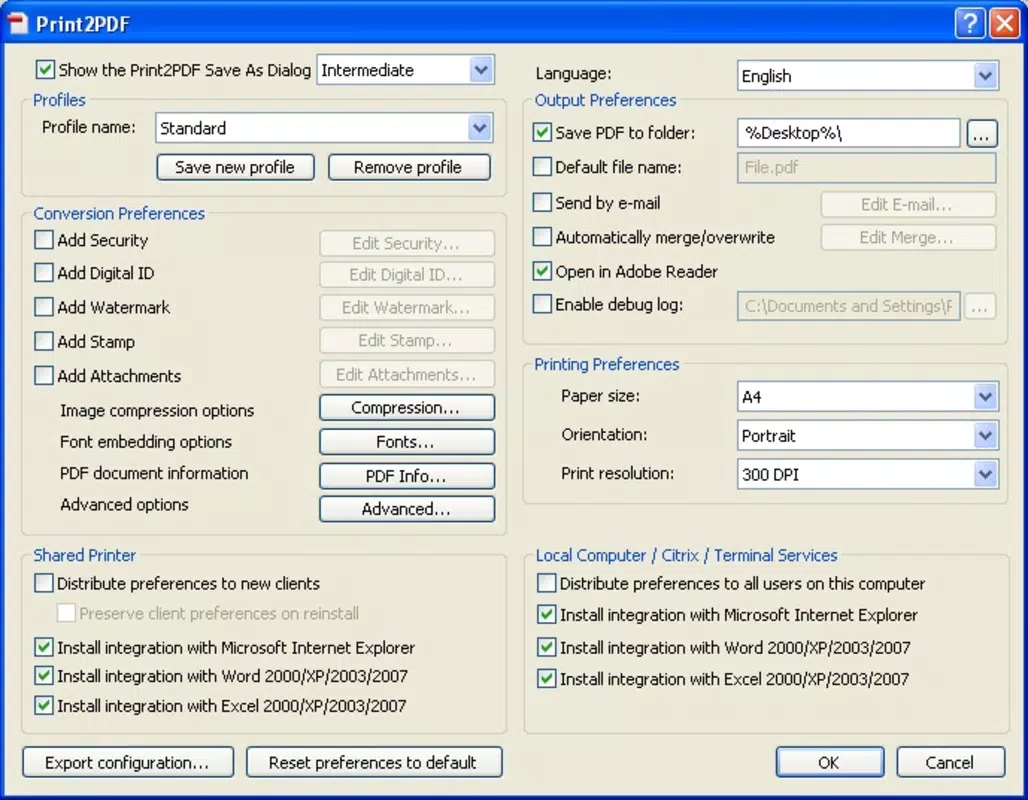
- Custom Paper Sizes and Resolutions: The app supports paper dimensions up to 200 inches and resolutions as high as 2400 DPI, enabling users to produce high-fidelity prints suitable for large-format projects, technical drawings, and detailed graphics.
- Document Security Features: Users can protect documents using 40-bit or 128-bit RC4 encryption. Additionally, digital signatures can be applied to verify authenticity and prevent unauthorized alterations, enhancing trust in shared files.
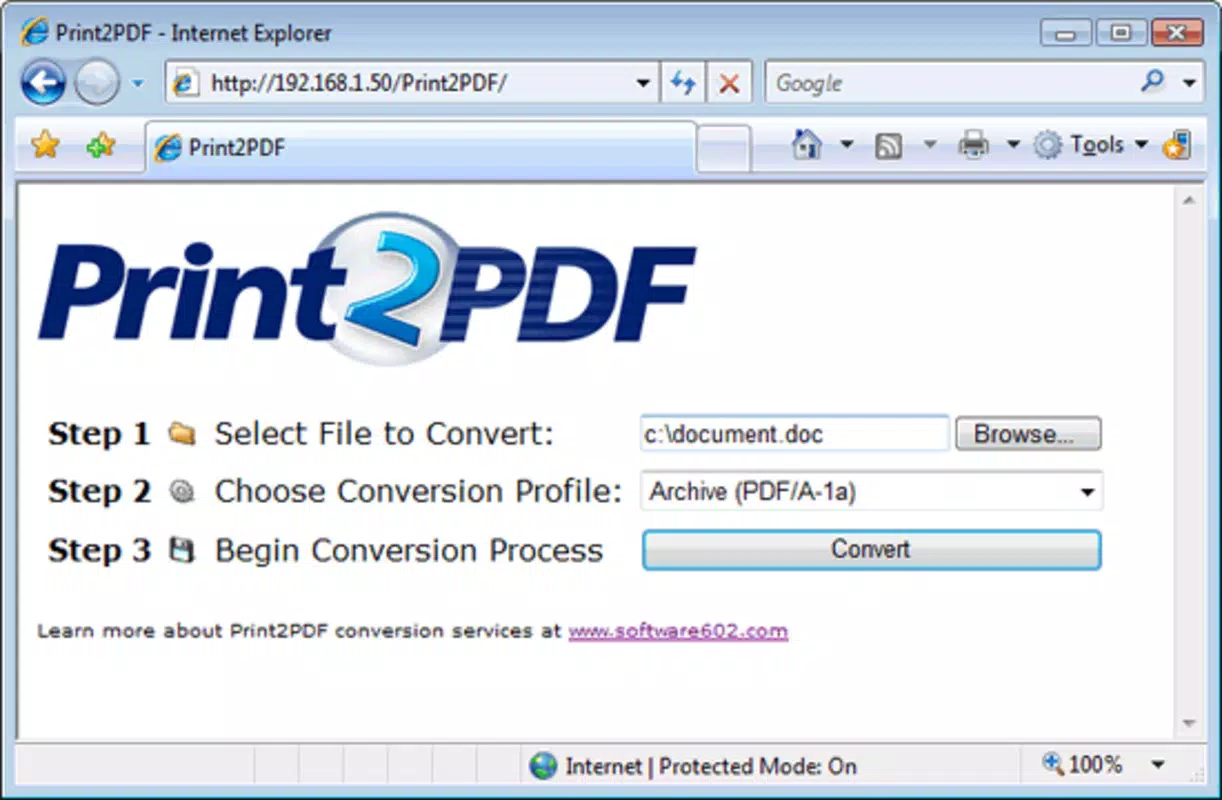
- Centralized Conversion Network: Through integration with Microsoft’s ISS server, Print2PDF allows for web-based file uploads and automated conversion within a local network. This reduces software deployment overhead and supports team-wide document standardization.
- Customizable Output: The tool enables the addition of watermarks, stamps, and file attachments directly within the PDF. This feature is useful for branding, internal labeling, or including supplementary materials without altering the original document.
For example, a legal firm could use Print2PDF to convert case files into secure, signed PDFs with watermarks indicating “Confidential.” Similarly, a design studio might leverage the 2400 DPI support to generate print-ready PDFs for large-scale banners. The centralized conversion feature is ideal for organizations managing multiple document workflows from a single server, improving efficiency and reducing software sprawl.
Interface, UX & Performance
Print2PDF presents a straightforward interface focused on core functionality, minimizing distractions for users who prioritize efficiency. The layout is consistent with traditional Windows printing workflows, allowing users to select Print2PDF as a virtual printer from any application that supports printing. This seamless integration enhances usability across diverse software environments.
Navigating through the app’s settings involves accessing a configuration panel where users can adjust paper size, resolution, encryption, and output options. The interface is logically organized, with clear labels and intuitive controls. Although the developer did not list formal performance metrics, the application’s ability to handle high-resolution outputs suggests optimized resource usage for its intended tasks.
Performance appears stable across different device categories, though specific hardware requirements were not disclosed. Responsiveness is expected to be adequate for standard document conversion tasks, particularly given the app’s focus on compatibility and reliability. The tool maintains consistency in output quality regardless of the source document type, indicating robust backend processing. Stability is further supported by its long release history and continued availability since 2009.
Platform Compatibility & Technical Requirements
Print2PDF is designed for the Windows operating system and requires a compatible Windows environment to function. The current version is 4.0.0.1, with a file size of 15.8 MB, making it a lightweight installation relative to its capabilities. The developer did not specify minimum OS requirements, nor did they list exact hardware or memory thresholds for optimal performance.
Given the app’s release date in 2009 and its continued availability, it likely supports modern Windows versions including Windows 10 and Windows 11, though users should verify compatibility with their specific system configuration. The absence of detailed technical specifications means that installation on newer systems may require compatibility mode or administrative privileges, especially if legacy components are involved.
For users seeking to deploy Print2PDF in a networked environment, the integration with Microsoft’s ISS server indicates a dependency on server-side infrastructure. This setup is best suited for enterprise or institutional use rather than individual desktop applications. The app does not appear to be available on mobile platforms, limiting its accessibility to Windows-based devices only.
Pros and Cons
Pros
- Generates PDFs compliant with Adobe and ISO standards for universal compatibility and long-term archiving.
- Supports extremely high resolutions (up to 2400 DPI) and large paper sizes (up to 200 inches).
- Offers robust security with encryption and digital signature functionality.
- Enables centralized conversion via Microsoft’s ISS server, ideal for team and organizational use.
- Provides customizable output with watermarks, stamps, and attachments.
Cons
- Not available on mobile platforms; limited to Windows-only deployment.
- Specific system requirements and compatibility details were not disclosed.
- Price point of $39.95 may be considered high for casual users.
- Limited public documentation on update frequency or future development plans.
- Interface may appear dated compared to modern software standards.
FAQ
Is Print2PDF compatible with Windows 11?
While the developer did not explicitly confirm Windows 11 compatibility, the app has been available since 2009 and is likely functional on modern Windows systems. Users may need to run it in compatibility mode or with elevated privileges.
Can I use Print2PDF on a Mac or mobile device?
Print2PDF is designed exclusively for Windows. There is no native version available for macOS, iOS, or Android. Users on other platforms may need to use alternative tools or virtualization solutions.
Does Print2PDF support batch processing?
The provided information does not specify batch conversion capabilities. The app appears to function as a virtual printer, processing one document at a time during the print workflow.
How secure is the encryption used in Print2PDF?
Print2PDF supports 40-bit and 128-bit RC4 encryption, which provides a reasonable level of protection for sensitive documents. However, users should be aware that RC4 has known vulnerabilities and may not meet the highest security standards for classified data.
Is there a free version or trial of Print2PDF?
Print2PDF is offered as a paid application priced at $39.95. No free version or trial was mentioned in the provided details. Users should verify the availability of a trial from the official developer source.
Final Thoughts
Print2PDF remains a dependable solution for users who demand precision, security, and compliance in their document conversion workflows. Its adherence to industry-standard formats, support for high-resolution outputs, and advanced security features make it a strong choice for professionals in regulated or high-stakes environments. While its interface may feel outdated and its pricing may deter casual users, its reliability and functionality justify its place in specialized productivity toolkits.
Organizations seeking centralized document management and consistent output quality will find significant value in the app’s network-based conversion capabilities. For individuals and teams requiring secure, standardized PDFs with minimal formatting loss, Print2PDF delivers consistent results across diverse use cases.
Download Print2PDF now


